AI Agents Masterclass for Beginners (full guide)
But most people couldn't explain what makes an agent different from ChatGPT if you asked them.
Everyone's talking about AI agents.
But most people couldn't explain what makes an agent different from ChatGPT if you asked them.
Here's the short version: A chatbot waits for you to ask a question. An agent goes and does the work.
That distinction changes everything about how you use AI in your business.
Here's a full breakdown of AI agents, what they are, when to use them, and how to get started.
PS: If you're non-technical and want to learn how to build custom agents, automations, and more you'll love our Build With AI community.
Join the waitlist here:
http://return-my-time.kit.com/1bd2720397
----------------------------------------
What Is an AI Agent, Really?
An AI agent is an AI tool that can:
- Take a goal or instruction
- Break it down into steps
- Execute those steps autonomously
- Adapt when things don't go as planned
The key word is autonomously.
When you use ChatGPT, you're having a conversation. You ask, it answers. You ask again, it answers again. You're driving.
When you use an agent, you give it a destination. It figures out the route, drives itself, and handles the detours.
Example:
Chatbot: "Write me an email to follow up with John about our meeting." → Gives you the email. You copy, paste, send.
Agent: "Follow up with everyone I met at last week's conference." → Pulls your calendar, identifies the meetings, drafts personalized emails for each person, schedules them to send at optimal times.
Same underlying AI. Completely different capability.
The Four Capabilities That Define Agents
1. Tool Use
Agents can use external tools. Not just generate text, but actually do things.
Send emails. Create calendar events. Update spreadsheets. Post to social media. Query databases. Make API calls.
This is the difference between AI that writes about doing work and AI that actually does work.
2. Memory
Agents remember context across sessions.
A chatbot forgets everything when you close the window. An agent remembers that you prefer morning meetings, that your biggest client is Sarah, that you're working on a product launch in Q2.
This persistent memory means the agent gets better at helping you over time.
3. Reasoning
Agents can break complex goals into subtasks.
You say: "Prepare for my podcast interview with Mike tomorrow."
The agent reasons through: research Mike's background, pull his recent content, identify talking points, draft intro questions, create a one-page brief, add it to tomorrow's calendar.
It doesn't just do one thing. It figures out what needs to be done.
4. Autonomy
Agents can work without constant supervision.
They can run on schedules. They can monitor for triggers. They can execute multi-step workflows while you're asleep.
This is where the real leverage comes from.
Chatbot vs. Agent: When to Use Which
This is where most people get confused. Let me make it simple:
Use a Chatbot When:
- You need a quick answer to a specific question
- You're brainstorming or exploring ideas
- You want real-time conversation and iteration
- The task is simple and self-contained
- You need to stay in control of every step
Use an Agent When:
- The task has multiple steps
- You want the work done, not just described
- The workflow repeats regularly
- You need integration with other tools
- You want to free up your time, not just get information
Real examples:
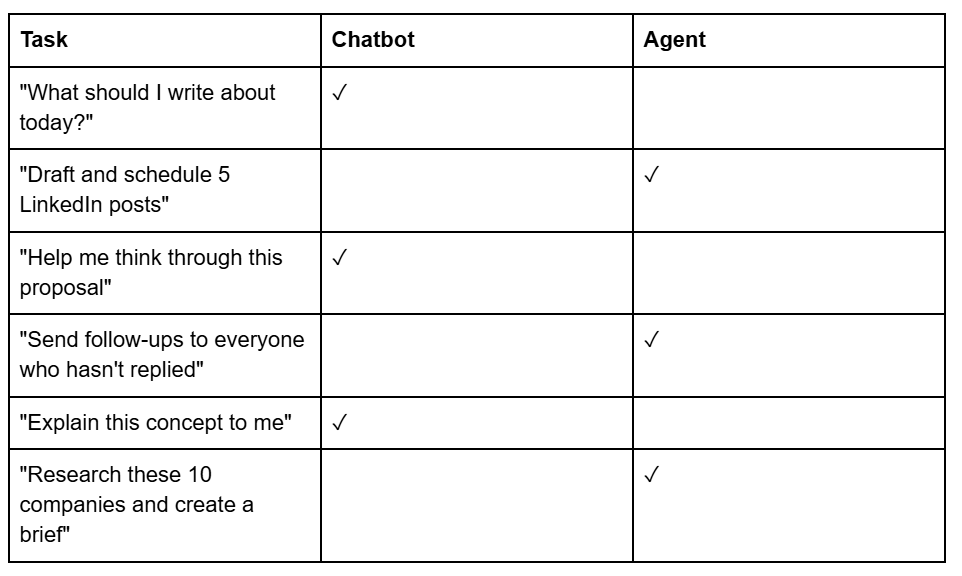
The rule of thumb: If you want thinking, use a chatbot. If you want doing, use an agent.
The Best Business Use Cases for Agents
After working with dozens of business owners on AI implementation, these are the use cases where agents deliver the biggest ROI:
1. Inbox Management
An agent that monitors your email, categorizes messages, drafts responses, and flags what needs your attention.
Time saved: 5-10 hours/week for most business owners.
2. Meeting Prep
An agent that researches attendees before calls, pulls relevant context from past conversations, and creates a one-page brief.
Never walk into a meeting unprepared again.
3. Content Repurposing
An agent that takes one piece of content (a podcast, a video, a long article) and turns it into multiple formats: social posts, email newsletters, quote graphics.
One input, ten outputs.
4. Lead Research
An agent that takes a list of companies or people, researches each one, and delivers a formatted brief with relevant details.
What used to take a VA 5 hours takes an agent 5 minutes.
5. Follow-up Automation
An agent that tracks conversations, identifies who needs a follow-up, drafts personalized messages, and either sends them or queues them for your approval.
Nothing falls through the cracks.
6. Report Generation
An agent that pulls data from multiple sources, analyzes trends, and produces a formatted report on a schedule.
Weekly metrics, monthly summaries, quarterly reviews. All automated.
Best Practices for Implementing Agents
1. Start with One Workflow
Don't try to automate everything at once.
Pick one repetitive task that takes you 2+ hours per week. Build an agent for that. Get it working reliably. Then expand.
2. Human-in-the-Loop First
Start with agents that draft, not agents that send.
Have the agent prepare the email, but you click send. Have the agent create the report, but you review before it goes out.
Build trust gradually. Increase autonomy as you gain confidence.
3. Define Clear Boundaries
Agents need guardrails.
What can it access? What can it modify? What requires approval? What should it never do?
The more specific your boundaries, the more reliably your agent will operate.
4. Monitor and Iterate
Check what your agents are doing. Review their outputs regularly.
They'll make mistakes. They'll misunderstand context. That's normal. The goal is to catch errors early and refine the instructions.
5. Document Your Workflows First
Before building an agent, write down exactly how you do the task manually.
What inputs do you need? What steps do you take? What tools do you use? What does "done" look like?
This documentation becomes your agent's instruction set.
Common Mistakes to Avoid
1. Going full autonomous too fast
The agent that sends emails without approval will eventually send an embarrassing one.
Build in checkpoints. Start supervised. Earn autonomy over time.
2. Vague instructions
"Handle my social media" is not an instruction.
"Every Monday at 9am, pull my top 3 tweets from last week, repurpose them into LinkedIn posts, and save drafts in Notion for my review" is an instruction.
Specificity matters.
3. Ignoring edge cases
What happens when the data is missing? When the API fails? When the format is unexpected?
Good agents handle errors gracefully. Build in fallbacks.
4. No feedback loop
If you never review your agent's output, you'll never know when it's drifting off course.
Schedule regular audits. Check the work. Provide corrections.
5. Automating the wrong things
Not everything should be automated.
High-stakes communication, creative decisions, relationship building. These benefit from human judgment.
Automate the repetitive work so you have more time for the work that matters.
How to Build Your First Agent
You don't need to code.
Option 1: Claude Projects + MCP
Create a Claude Project with instructions and connected tools. Claude can read files, access the web, and use MCP integrations to connect to external services.
Good for: Personal productivity, research, content creation.
Option 2: Claude Cowork
Claude's built-in agent mode that can browse the web, write and execute code, and complete multi-step tasks autonomously. Available on any Claude paid plan.
Good for: Research, analysis, building deliverables, tasks that require web access.
Option 3: Manus
A cloud-based agent platform that handles complex tasks with a polished interface. Assigns the right AI model for each subtask automatically.
Good for: Users who want agent capabilities without technical setup. Works even when your computer is off.
Option 4: OpenClaw
An open-source agent framework that runs locally on your machine with full access to your files, tools, and custom skills. More powerful and flexible than the other options.
Good for: Power users who want maximum control and customization.
Note: OpenClaw is a more advanced tool. It requires additional setup to secure properly and unlock its full potential. Start with Options 1-3 if you're new to agents, then graduate to OpenClaw when you're ready for more.
The Agent Mindset Shift
Here's what most people miss:
Using agents requires you to think differently about work.
Instead of asking "How do I do this task?" you ask "How do I describe this task so an agent can do it?"
Instead of doing the work yourself, you design the workflow and let the agent execute.
This is a skill. It takes practice. But once you develop it, your leverage multiplies.
The business owners who figure this out first will have a massive advantage for the next few years.
Key Takeaways
- Chatbots answer. Agents do. The core difference is autonomy and tool use.
- Four capabilities define agents: Tool use, memory, reasoning, autonomy.
- Use chatbots for thinking, agents for doing. Match the tool to the task.
- Best ROI use cases: Inbox management, meeting prep, content repurposing, lead research, follow-ups, reports.
- Start small: One workflow, human-in-the-loop, clear boundaries, regular monitoring.
- Avoid common mistakes: Don't go full autonomous too fast. Be specific. Handle edge cases. Review outputs.
- You don't need to code: Claude Projects, Claude Cowork, and agent platforms make it accessible.
PS: If you're non-technical and want to learn how to build custom agents, automations, and more you'll love our Build With AI community.
Join the waitlist here: